Boards
Boards the whole company can read
List or board, grouped by status, with sprints and saved views for the work you come back to.
- List and Board views
- Sprints
- Saved views


Every feature unlocked for your whole team: tasks, sprints, boards, requests, and your calendar with meetings built in, at one flat yearly price. A 25-person team pays $100/year. Not per person. Total.
No card required · Set up in 2 minutes.
Open a new task from anywhere
Powerful enough for engineers. Simple enough for accountants, designers, agencies, and everyone in between.

The big trackers charge per seat because it grows their revenue, not your adoption. We charge flat: every feature, every person, no "who gets a license" meetings. Invite the whole company; the price doesn't move.
Compare plansOther trackers open a task as a full-page takeover and your context is gone. TaskShelf opens it in a half-sheet beside the board; Esc closes it. Small thing. Every day. Hundreds of times.
List or board, grouped by status, with sprints and saved views for the work you come back to.
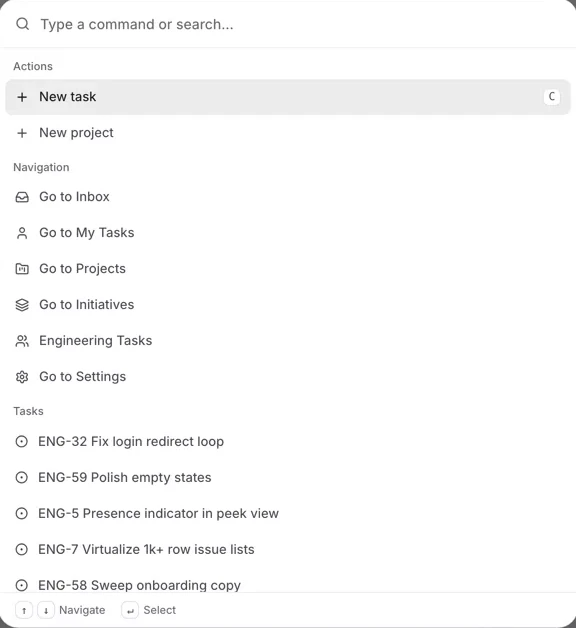
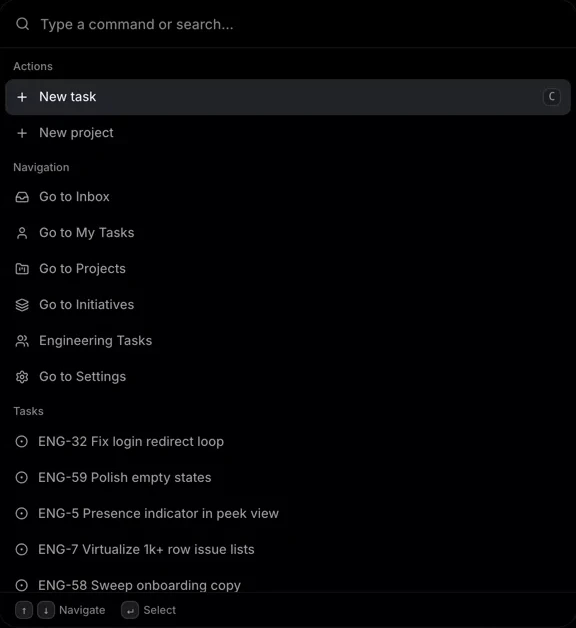
⌘K opens the command menu on the web and in the macOS, Windows, and Linux apps.
Slack, GitHub, in-app feedback, and the API land in one human-reviewed queue, so your team decides what becomes work.


Your team size sets your tier - there's nothing to configure and no one to leave out. Every tier gets everything.
All 12 included on every plan. No add-ons, no feature gates.
TaskShelf isn't built for one kind of team. If a feature you need doesn't exist yet, ask for it. When the community votes it up, we build it.
Missing something your team needs? Open the lightbulb in any corner of TaskShelf and say it in a sentence.
Every customer sees the same board and upvotes what would help them most. Accountants and engineers get the same vote.
The most-wanted requests move to planned, then into development, and ship to every plan at no extra cost.
Ask for a feature from the lightbulb
What TaskShelf is, and why we built it.
Bring work in from the tools your team already owns. Every request lands in the same reviewed queue as everything else.
/api/tasks// New engineering request
{
"title": "Checkout button unresponsive on iOS",
"source": "your-app"
}
201 Created
{ "id": "ENG-61" }Web and desktop today. iPhone and Android next.
Real humans. Fast. Named. Meet the founders
Encrypted, backed up, yours.
Can't find what you need? Email support
TaskShelf is task and project management for any team, including accountants, designers, developers, and agencies, with tasks, projects, sprints, boards, and real-time collaboration, at one flat yearly price for the whole team.
TaskShelf charges a flat price per workspace, based on active headcount. Ember is $10/month or $100/year for up to 25 people; Blaze is $20/month or $200/year for up to 50; Nova is $30/month or $300/year for up to 100. Supernova has custom pricing above 100 people. Every plan includes every feature.
TaskShelf is built by TaskShelf LLC, a US company registered in Wyoming, United States. Our address is 30 N Gould St, Ste R, Sheridan, WY 82801, USA.
TaskShelf works on the web and has native desktop applications for macOS, Windows, and Linux. Teams can also connect through the REST API.
Yes. Cmd or Ctrl plus K opens the command menu, and documented shortcuts cover creating, searching, filtering, navigating, and processing requests.
Team requests can enter from Slack, GitHub, in-app feedback, or the REST API. A person reviews the request queue before work moves onto the board.
Yes. The REST API uses Bearer API keys, includes the /api/tasks endpoint, has a 120 requests-per-minute rate limit, and signs webhooks with HMAC-SHA256.
Yes. Start free for 7 days at workspace.taskshelf.app/signup. No card required.
Built by a US-registered team that ships updates constantly. Request a feature in-app and watch it appear.
No card required · Set up in 2 minutes.